How Can I Spend Crypto Using PIX In Brazil with KAST?
Spend crypto in Brazil with KAST. Convert crypto to USD instantly, then pay anywhere using PIX Scan, KAST Card, or Apple Pay. Get transparent rates, low fees, and instant BRL payments at any merchant.
Key Takeaways
- KAST lets you spend crypto in Brazil instantly by converting your USD balance to BRL at checkout via card, mobile wallet, or PIX.
- Choosing BRL instead of USD at the terminal usually results in lower costs by avoiding merchant-controlled Dynamic Currency Conversion.
- PIX Scan to Pay offers fee-efficient, real-time payments directly to Brazilian merchants using local rails.
You can now use your crypto to pay for everyday needs in Brazil, from your morning coffee to a night out. With KAST, you send your crypto, it automatically converts to stablecoins, and you can spend instantly anywhere using your KAST Card, Mobile Wallets, or the latest PIX integration.
After you deposit, your balance stays in USD, helping protect your funds from inflation and giving you instant spending whenever you need it.
How to Get Started with KAST in Brazil
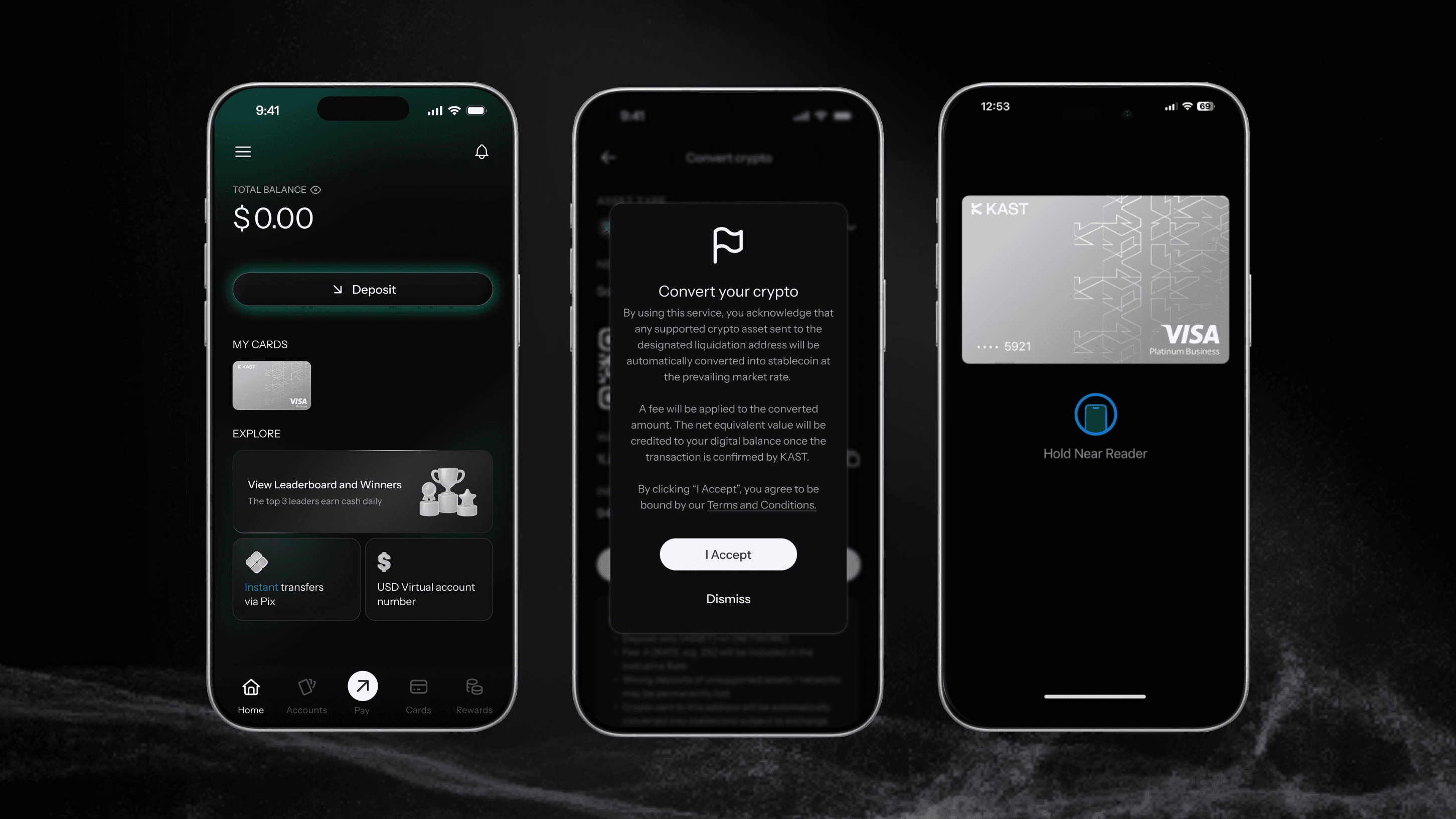
- Open your account and deposit stablecoins. They go straight to your USD balance at 1:1
- Send other currencies and KAST will automatically convert them to stablecoins at the best rate
- Your KAST Card is ready to use in Brazil. Add it to Apple Pay / Google Pay or use your physical card at any Visa-accepted location
3 Ways to Spend Crypto in Brazil with KAST
KAST makes it easy to spend your crypto in the real world, in any store, café, or restaurant that accepts PIX or Visa.
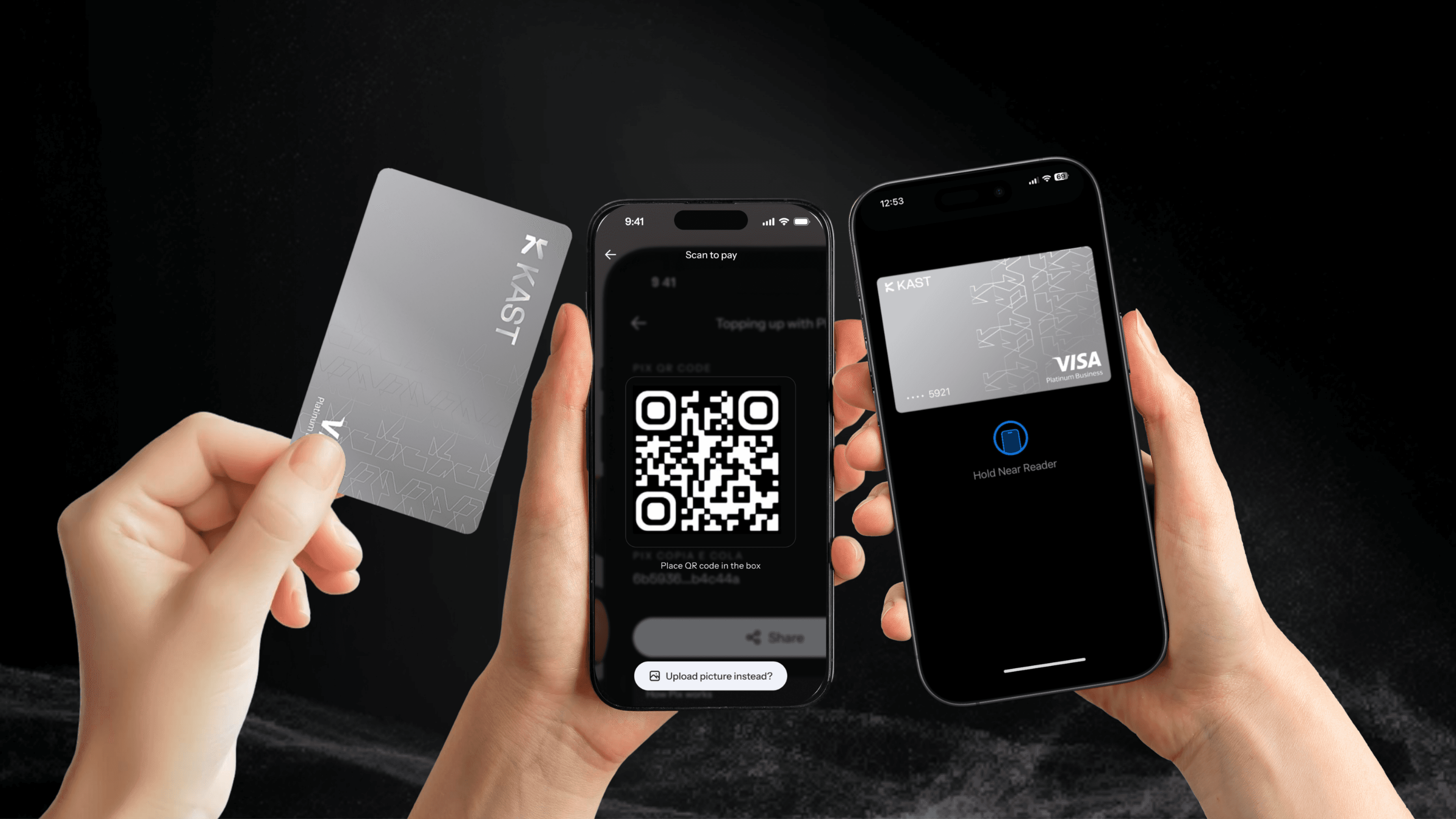
Option 1: KAST Card
Tap or insert your physical KAST Card and pay instantly. Your crypto converts from USD → BRL at the moment of purchase. Fast, simple, done.
Option 2: PIX Scan to Pay
Open the KAST app, scan the merchant’s PIX QR code, confirm, and pay. The app converts your crypto to BRL instantly, and the merchant receives it right away.
Option 3: Mobile Wallet (Apple Pay or Google Pay)
Use your KAST Card through Apple Pay for fast, contactless spending. Add your virtual card to your phone and pay anywhere with a tap.
How Do I Spend My Crypto in Brazil Using PIX Scan to Pay?
The KAST app makes it easy to spend your crypto balance at any merchant in Brazil that accepts PIX.
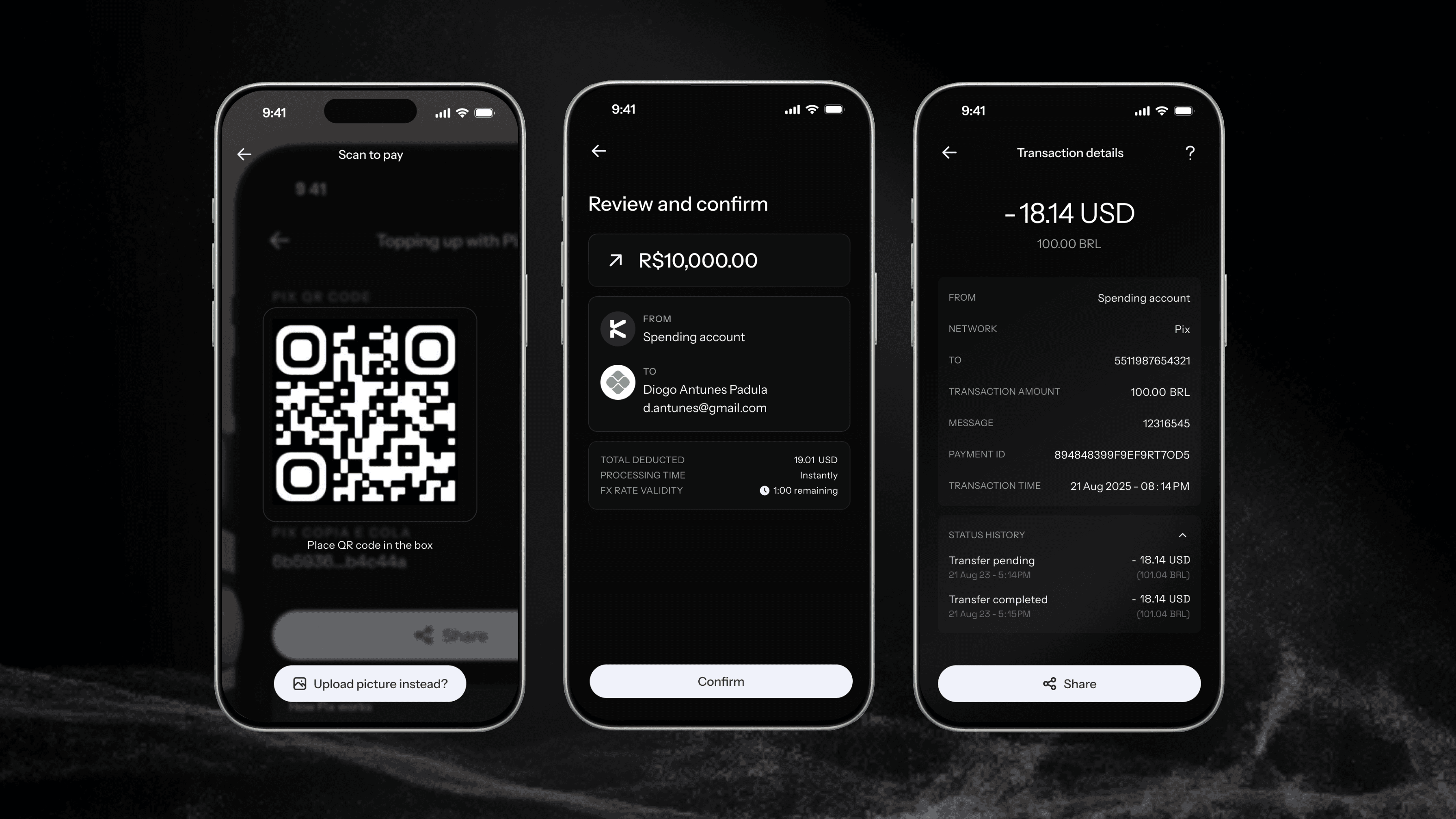
- Scan the QR Code: Open the KAST app and scan the merchant’s PIX QR code at checkout
- Review and Confirm: Your KAST app shows the BRL total the merchant receives and the equivalent USD amount deducted from your balance
- All Done: The merchant receives BRL instantly
What Are the KAST Card Fees When I Pay in Brazil?
When you pay in BRL, KAST handles the conversion from USD → BRL using a transparent market-based rate plus a 2% FX fee.
If you choose to pay in USD (when available), some merchants may use Dynamic Currency Conversion (DCC), applying their own exchange rate, which is often higher than KAST’s.
There’s no standard transaction fee per purchase (including Apple Pay and Google Pay).
However:
- A $0.50 declined transaction fee applies only if your payment fails due to insufficient balance
- For non-USD transactions below $25, a small $0.10 low-authorization fee may apply
PIX Scan to Pay
When you use PIX Scan to Pay, your crypto is converted instantly to BRL at the market rate. There’s no transaction fee for the payment itself.
When depositing via PIX, standard network and FX fees apply: 0.38% IOF tax + 0.5% FX fee (≈0.88% total).
For PIX payouts, the fee is 0.38% IOF + 0.62% FX.
For full fee details and terms, visit the KAST Fees & Conditions page.
Which Receipt Option Should I Choose at the Terminal?
When paying with your KAST Card or mobile wallet (Apple Pay / Google Pay), the terminal may ask if you want to pay in BRL (Real) or USD (Dollar).
Although it might seem logical to choose USD if your balance is in dollars, in Brazil we recommend to almost always select BRL (Real).
Why You Should Choose BRL
- Most merchants only process BRL, even if you choose USD
- Selecting USD triggers Dynamic Currency Conversion (DCC) by the merchant or processor - using their own (often worse) exchange rate
- Selecting BRL lets KAST handle the conversion, applying a transparent market-based rate + up to 2.5% spread
Example: Paying in Brazil: BRL vs USD
Here’s an example from a coffee shop in Blumenau, Santa Catarina, where the same R$7.50 item was paid twice: once selecting BRL, and once USD.
Option 1: Paying in BRL (Recommended)
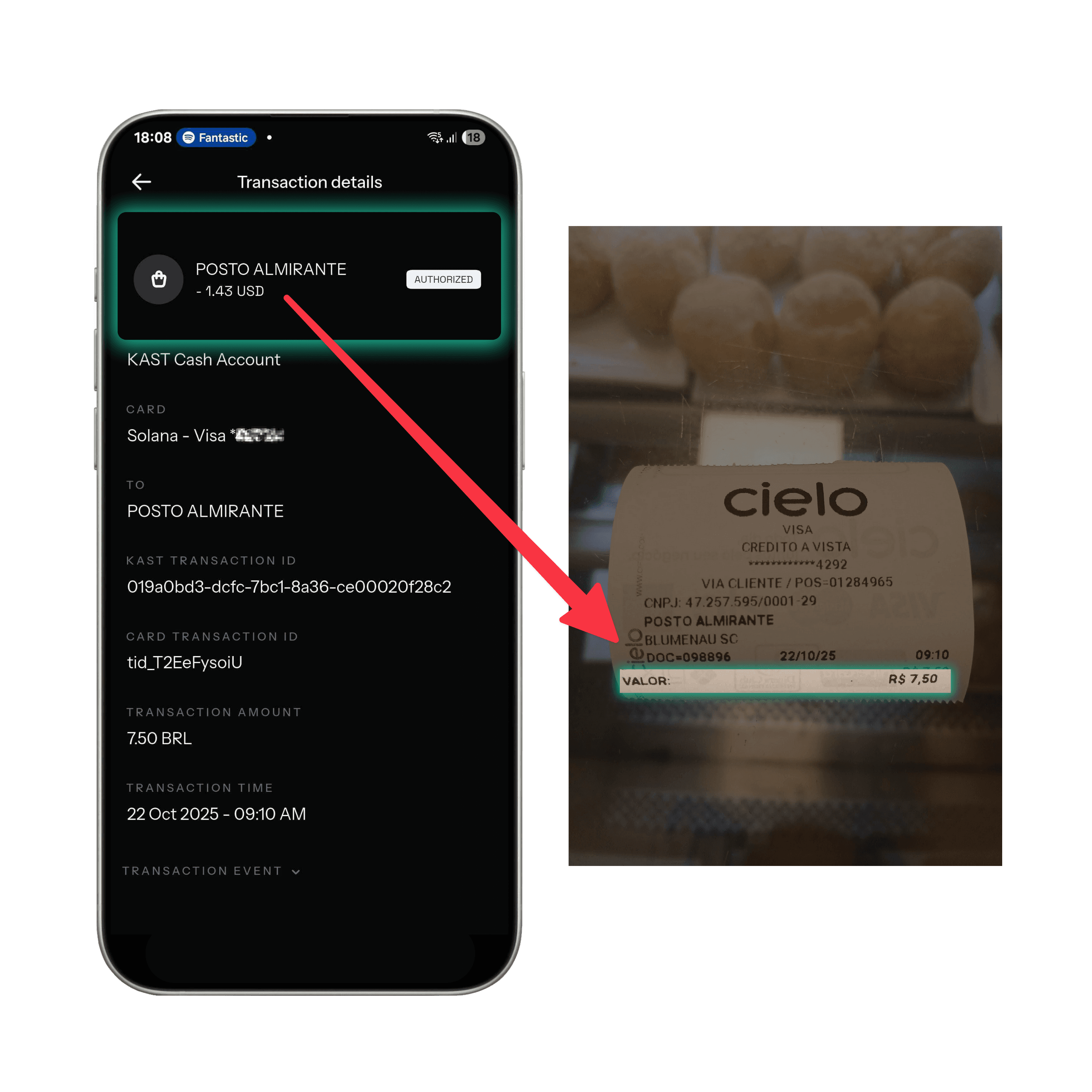
Transaction Overview
- Terminal Selection: BRL (Real)
- Conversion By: KAST
- Amount Charged: $1.43 USD
- Exchange Rate: 1 USD = R$5.24
- Outcome: Lower total cost, transparent market rate
Option 2: Paying in USD (Merchant Conversion)
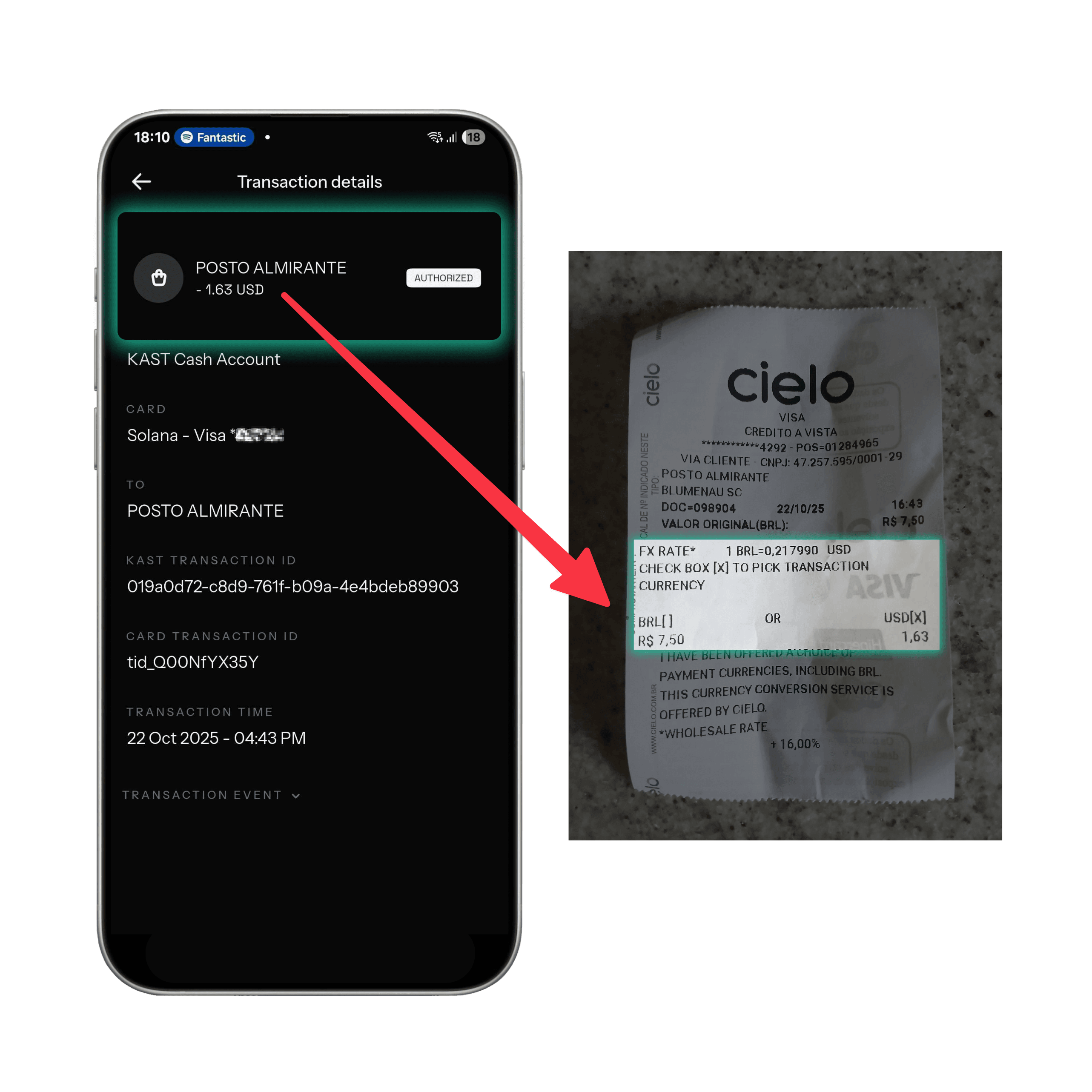
Transaction Overview
- Terminal Selection: USD (Dollar)
- Conversion By: Merchant/Processor
- Amount Charged: $1.63 USD
- Exchange Rate: 1 USD = R$4.60
- Outcome: Higher cost due to merchant markup (~14%)
Cost Comparison Summary
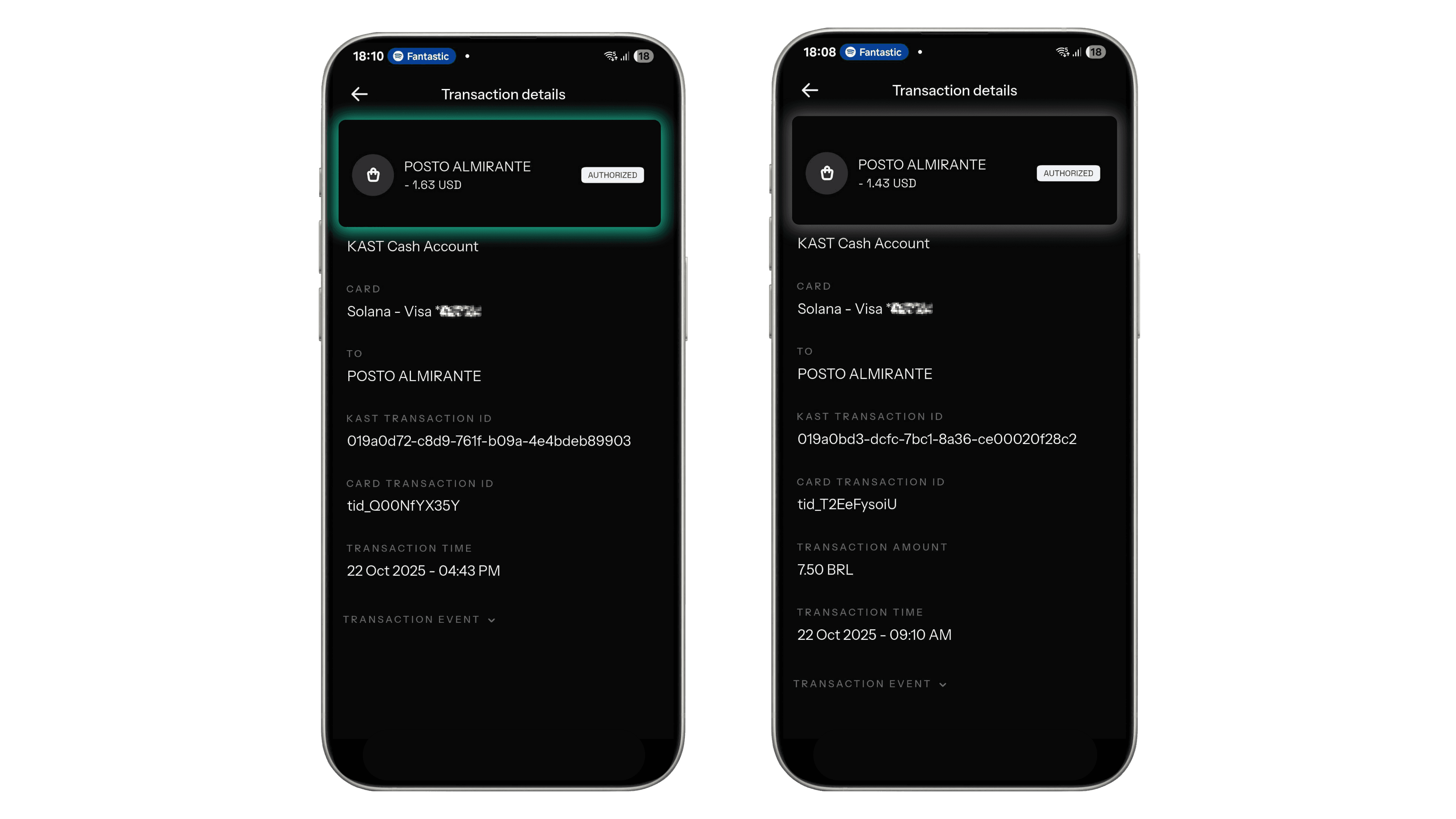
BRL (Recommended) ✅
- Conversion By: KAST
- Amount Charged: $1.43 USD
- Exchange Rate: 1 USD = R$5.24
- Difference: Lower cost
USD (Merchant) ❌
- Conversion By: Cielo
- Amount Charged: $1.63 USD
- Exchange Rate: 1 USD = R$4.60
- Difference: Up to 14% higher cost
Tip : When paying in Brazil, always choose BRL (Real) at the terminal. This ensures KAST, not the merchant, handles your currency conversion, usually resulting in a lower overall cost and more transparent rates.
Watch KAST in Action
Want to see how it works in real life? Check out these videos featuring our Brazilian users paying with KAST at local merchants - using the KAST Card, Apple Pay, and PIX Scan to Pay:
Ready to bridge the gap between crypto and everyday spending?
Start using your crypto with KAST Card today.
Disclaimer: This content is provided by KAST Academy for educational purposes only and is not intended as financial advice or a recommendation to engage in any transaction. All information is provided "as-is" and does not account for your individual financial circumstances. Digital assets involve significant risk; the value of your investments may fluctuate, and you may lose your principal. Some products mentioned may be restricted in your jurisdiction. By continuing to read, you agree that KAST group, KAST Academy, its directors, officers and employees are not liable for any investment decisions or losses resulting from the use of this information.
Related articles
How Can I Spend Crypto Using My KAST Card in Mexico?
KAST makes it easy to spend, send, and receive dollars in Mexico using cards, SPEI transfers, and digital wallets. Learn how currency selection at the terminal affects your costs and how to avoid hidden conversion fees.
How Can I Spend My Crypto Using KAST Card in Armenia
A real in-store payment in Yerevan using a KAST virtual card. See exactly how tap to pay works in Armenia, including the receipt, fees, instant notifications, and rewards, no crypto steps, no surprises.
USD vs AED: Which One Should You Pick on the Terminal in the UAE?
When a card terminal in the UAE asks whether to pay in USD or AED, that choice decides who sets your exchange rate. In most cases, choosing AED is cheaper. Here’s why.