How Can I Spend Crypto Using My KAST Card in Mexico?
KAST makes it easy to spend, send, and receive dollars in Mexico using cards, SPEI transfers, and digital wallets. Learn how currency selection at the terminal affects your costs and how to avoid hidden conversion fees.
Key Takeaways
- KAST lets you easily spend, send, and receive dollars in Mexico through SPEI transfers, card payments, ATMs, and peer-to-peer transfers, with automatic currency conversion.
- Always choose MXN when paying with your KAST Card in Mexico so KAST applies live market rates instead of costly merchant conversions.
- Paying in USD at the terminal usually means higher fees, while choosing MXN can save you up to 10–15% per purchase.
How Can I Spend, Send and Receive Dollars in Mexico?
Yes! You can receive dollars, move pesos to and from Mexican banks, cash out money in ATMs, pay merchants online, in stores, or split bills with friends directly using KAST. Here's how:
- SPEI Transfers: Send and receive funds using your CLABE.
- KAST Card (Physical): Use your KAST card everywhere Visa is accepted. Tap at terminals or shop online. KAST automatically converts crypto to complete your payments.
- Digital Wallets: Add your KAST card to Google Pay or Apple Pay for contactless payments.
Remember: KAST automatically converts any currency to dollars when it lands in your account. When you send funds, KAST converts them automatically to MXN if you're using SPEI, or to any international currency you select when using Global Payouts.
Let's focus on card payments. When you pay at a terminal in Mexico, the machine asks whether you want to pay in MXN or USD. This happens because your KAST Card is issued outside Mexico. And yes, choosing one over the other makes a real difference.
Example: Paying with Your KAST Card in Mexico (MXN vs USD at the Terminal)
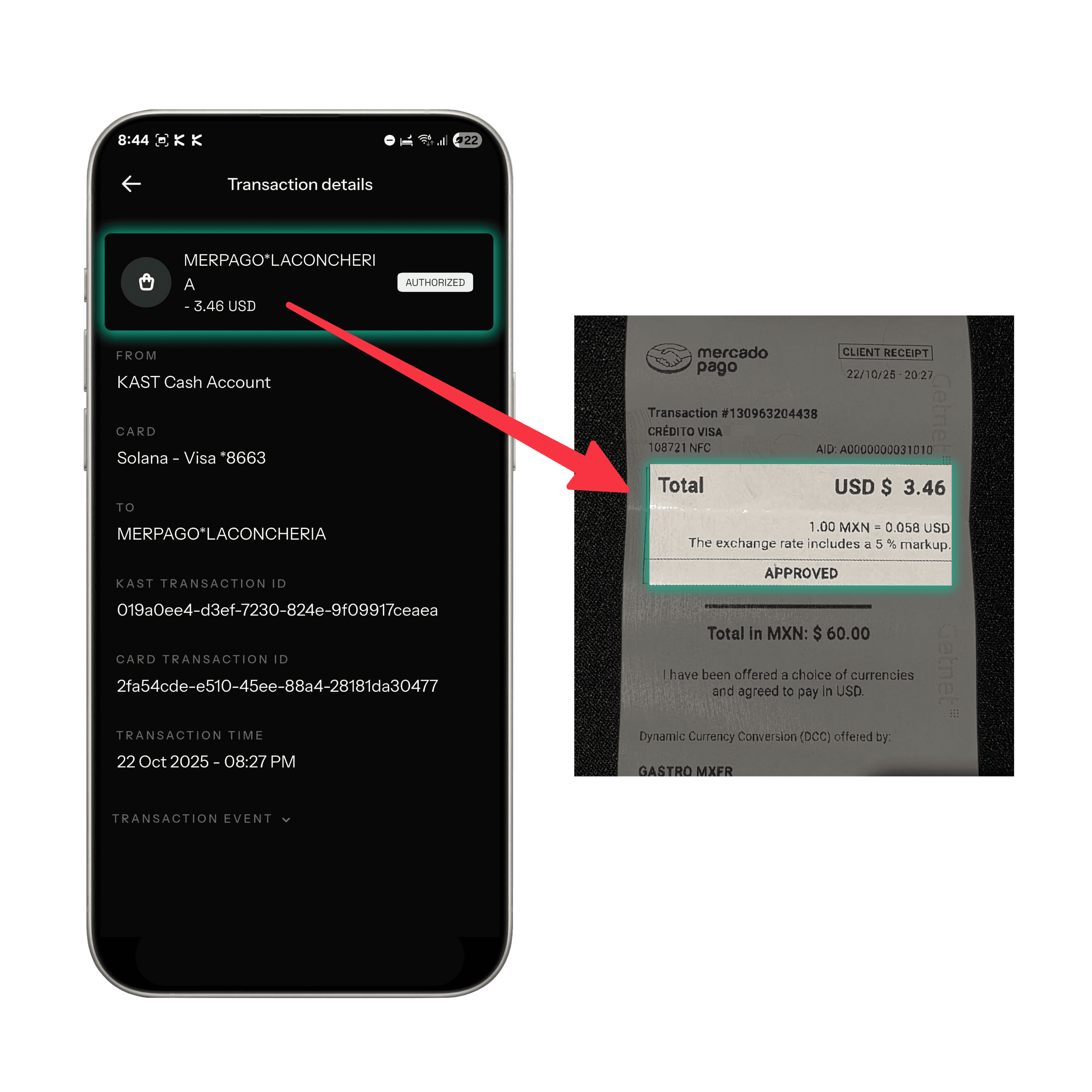
Here’s an example based on a purchase in a local bakery in Mexico City. The total cost changes depending on whether you choose MXN or USD at the payment terminal.
Option 1: Paying in MXN (Recommended)
Option 2: Paying in USD (Merchant Conversion)
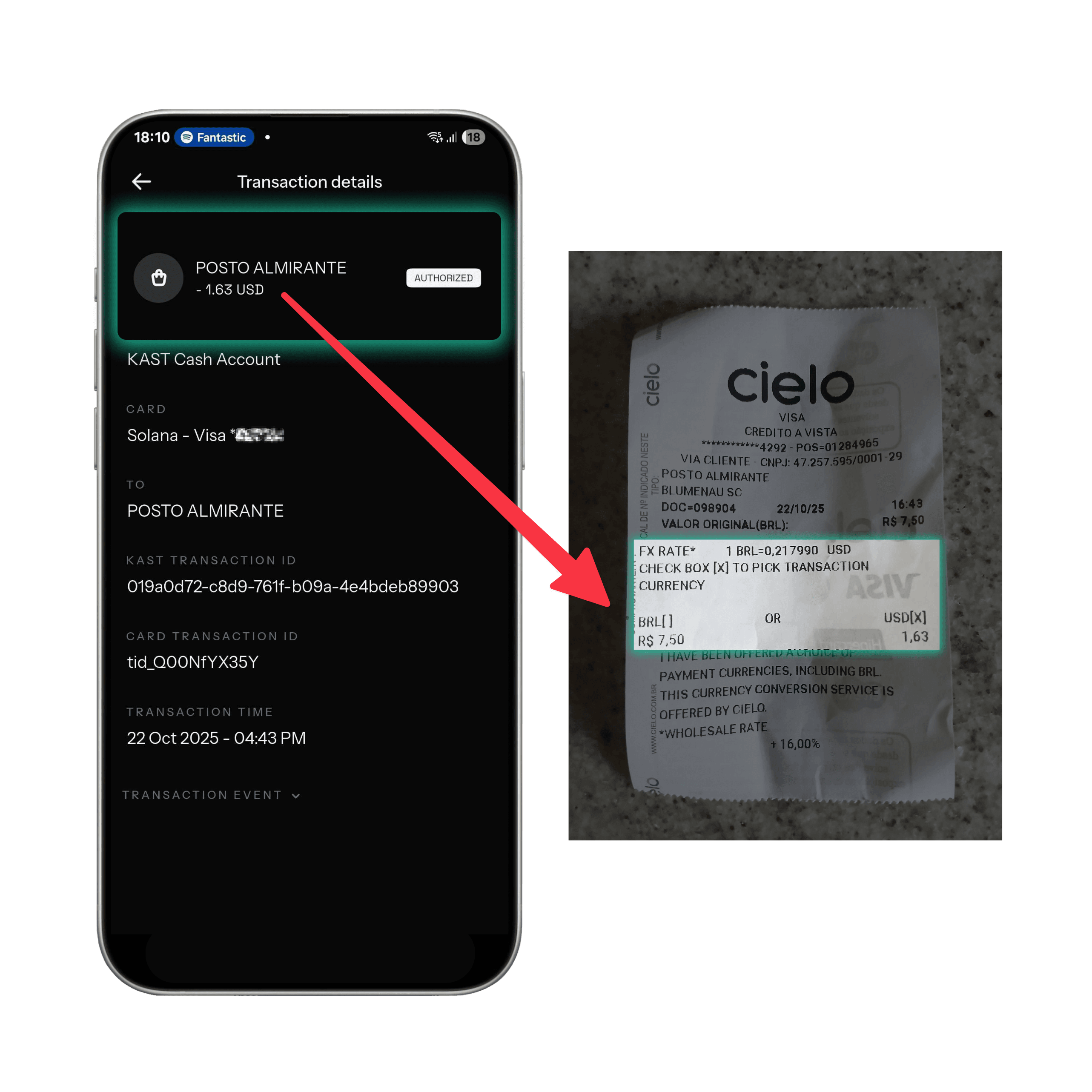
Cost Comparison Summary
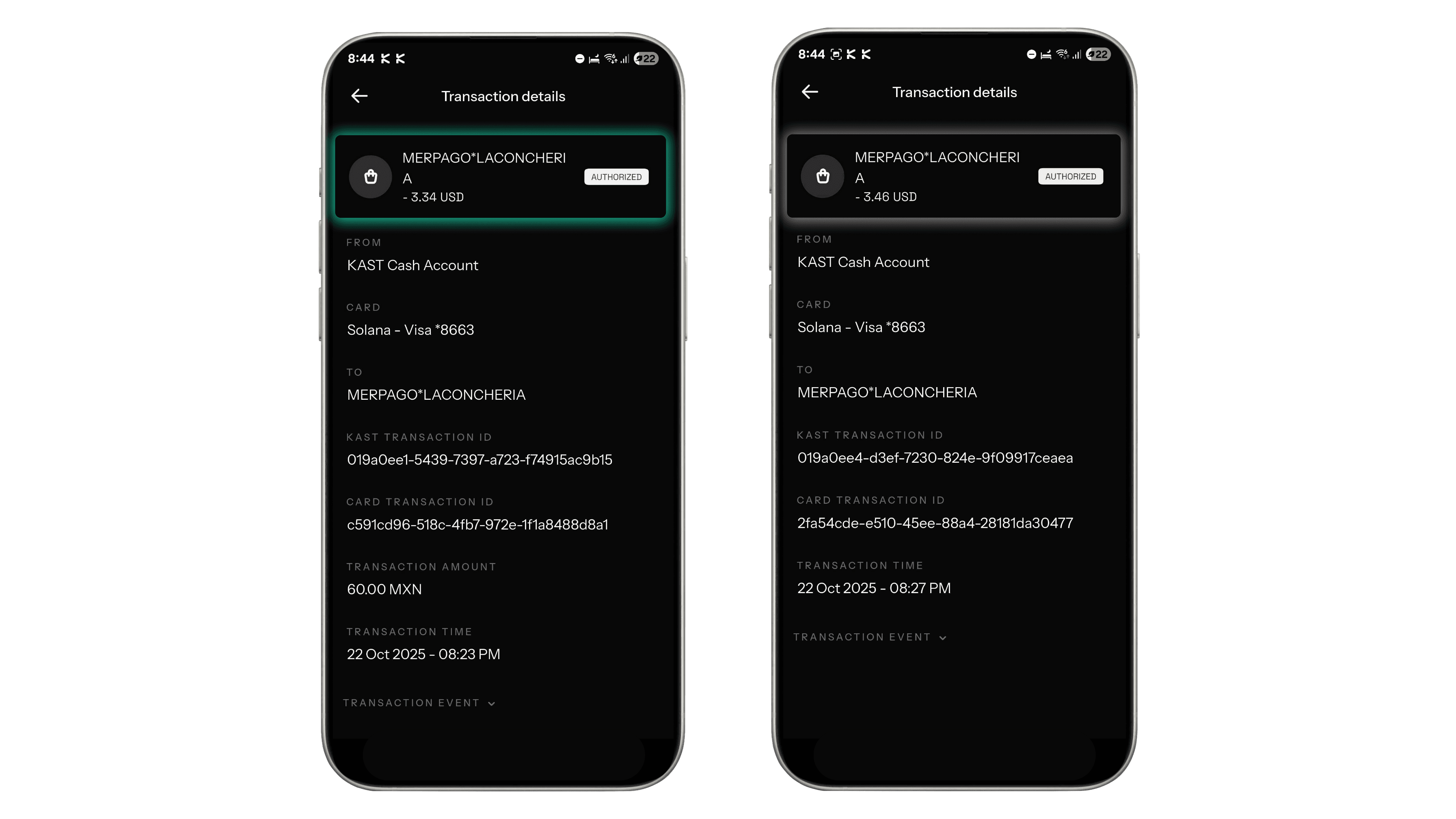
Tip: Always Choose MXN at the Terminal
When the card terminal asks whether to pay in MXN (Peso) or USD (Dollar):
- Choose MXN, so KAST handles conversion using live market rates.
- Avoid USD - most merchants use Dynamic Currency Conversion (DCC), which adds hidden markups.
Choosing MXN usually saves you up to 10–15% per purchase.
Ready to bridge the gap between crypto and everyday spending?
Start using your crypto with KAST Card today.
Disclaimer: This content is provided by KAST Academy for educational purposes only and is not intended as financial advice or a recommendation to engage in any transaction. All information is provided "as-is" and does not account for your individual financial circumstances. Digital assets involve significant risk; the value of your investments may fluctuate, and you may lose your principal. Some products mentioned may be restricted in your jurisdiction. By continuing to read, you agree that KAST group, KAST Academy, its directors, officers and employees are not liable for any investment decisions or losses resulting from the use of this information.
Related articles
Peso Strong, Dollar Weak: What It Means for Your Money
A strong peso and weak dollar do not affect everyone the same way. Learn how exchange rates, FX fees, and where you earn and spend actually shape your buying power in Mexico.
How Can I Spend My Crypto Using KAST Card in Armenia
A real in-store payment in Yerevan using a KAST virtual card. See exactly how tap to pay works in Armenia, including the receipt, fees, instant notifications, and rewards, no crypto steps, no surprises.
How Can I Spend Crypto Using PIX In Brazil with KAST?
Spend crypto in Brazil with KAST. Convert crypto to USD instantly, then pay anywhere using PIX Scan, KAST Card, or Apple Pay. Get transparent rates, low fees, and instant BRL payments at any merchant.