USD to Naira Conversion Fees Explained: KAST vs Bitget P2P
USD to local currency fees include exchange-rate spreads, platform or trading fees, and payout costs. Understanding these fees helps you compare platforms and avoid hidden reductions in your final payout.
You sent $1,000. The rate said ₦1,480 per dollar. You expected ₦1,480,000 in your account.
You got ₦1,473,000.
Where did ₦7,000 go?
Short answer: fees. Long answer: the kind that quietly sneak in when you’re not looking.
Converting USD or stablecoins into local currency often comes with hidden costs: spreads, FX markups, and withdrawal fees that aren’t always obvious upfront.
Platforms like KAST and Bitget offer different ways for you to move from USD to local currencies, but the total cost can vary the total cost can vary a lot depending on how the conversion actually happens.
In this guide, we compare KAST vs Bitget P2P fees for USD-to-local currency conversions, using NGN as a real-world example to show how costs add up in practice.
How USD-to-Local Currency Conversions Work
A USD-to-local currency conversion happens whenever you move U.S. dollars into another currency, like converting USD to NGN, EUR, or GBP. This process sits at the center of how crypto platforms, exchanges, and payment apps handle withdrawals, payouts, and card spending across borders.
In most cases, the conversion follows three basic steps:
- Your funds start as USD, either from a bank transfer, a stablecoin like USDC or USDT, or a converted crypto deposit.
- The platform converts USD into the local currency using its own rate. This rate may differ from the mid-market rate you see on Google because it often includes a spread or markup.
- Fees are added. Conversion costs can show up as:
- Explicit transaction fees
- FX markups baked into the exchange rate
- Additional withdrawal or payout fees
The key thing to know is this: not all USD-to-local currency conversions cost the same, even when the amount is identical.
Two platforms can convert the same $1,000 USD and deliver different final amounts in local currency due to differences in FX spreads, fees, and payout rails.
Why Rates Differ From “Market Price”
Many people expect conversions to match the mid-market or “Google” rate. In practice, platforms rarely convert at that exact rate. Instead, they apply:
- A spread between buy and sell prices
- A platform margin to cover costs and risk
- Local liquidity adjustments, especially in markets like Nigeria
This is why comparing USD-to-local currency fees requires looking at both the rate used and the final amount received, not just advertised fees.
Why This Matters for You
When you’re converting USD to a local currency, small percentage differences add up quickly. A 2–4% difference in FX pricing on a $1,000 conversion can mean receiving tens of thousands of Naira less than expected.
That’s why understanding how USD-to-local currency conversions work is essential before choosing a platform, especially when comparing services like KAST vs Bitget, where the conversion model, fee structure, and payout flow differ.
What Fees Matter When Converting USD to Local Currency
When converting USD to a local currency, what you receive depends on more than the headline exchange rate. Total costs often include multiple fees, some of which aren’t immediately visible.
Exchange Rate (FX Rate)
The exchange rate used is often the biggest factor. Many platforms apply a spread instead of the true mid-market rate, quietly reducing the amount you receive. This hidden cost is especially common in markets with currency controls or limited liquidity, such as Nigeria.
Conversion or Trading Fees
Some platforms charge explicit conversion or trading fees, either as a flat fee or a percentage. Others bundle these costs into the exchange rate, which makes them harder to spot unless you compare final payouts.
Withdrawal and Payout Fees
Additional fees may apply when withdrawing converted funds to a local bank. These depend on the payout method, destination bank, and currency, and they further reduce what lands in your account.
How USD-to-Local Currency Conversions Work on KAST
KAST handles USD-to-local currency conversions through a direct, account-based flow rather than peer-to-peer trading. Instead of finding a buyer or negotiating rates, you start with a USD balance in your KAST account and convert it when you withdraw.
Here’s how it works in practice:
- Fund your KAST account in USD: Add funds via USD bank transfers, supported stablecoins like USDC or USDT, or crypto deposits converted into a single USD balance.
- Initiate a local payout: Select a local payout (e.g. NGN) in the app, and KAST converts and sends funds to a supported local bank account.
- Review rates and fees upfront: You see the exchange rate, FX fees, and estimated delivery time before confirming.
- Receive funds via banking rails: Payouts are processed through local banking rails, typically within 1-5 business days, depending on the country and bank.
How USD-to-Local Currency Conversions Work on Bitget P2P
On Bitget, USD-to-local currency conversions often happen through a peer-to-peer (P2P) marketplace, particularly in countries where direct fiat off-ramps are not available. This means you’re not converting USD inside Bitget itself, but you’re trading stablecoins for local currency with another user.
Here’s how the process typically works:
- Hold stablecoins: You start with a supported asset, usually USDT or USDC, in your Bitget account.
- Browse the P2P marketplace: Bitget lists buyers offering local currency in exchange for stablecoins, with visible rates, limits, payment methods, and seller reputations.
- Place a trade: You sell your stablecoins to a selected buyer who agrees to send you local currency (such as NGN).
- Receive payment off-platform: The buyer sends funds directly to your bank or payment wallet, and Bitget releases the stablecoins once you confirm receipt.
- Rates and timing vary: Prices are set by users, fees are usually baked in the rate, and transfer times depend on the buyer and your bank.
Example Comparison: Converting USD to NGN
To make the difference clearer, let’s look at a simple USD-to-NGN conversion using $1,000 as the example amount. This helps illustrate how fee structures impact the final amount you receive, even before exchange rates are considered.
Converting USD to NGN on KAST
With KAST, USD to local currency conversions use a flat fee model.
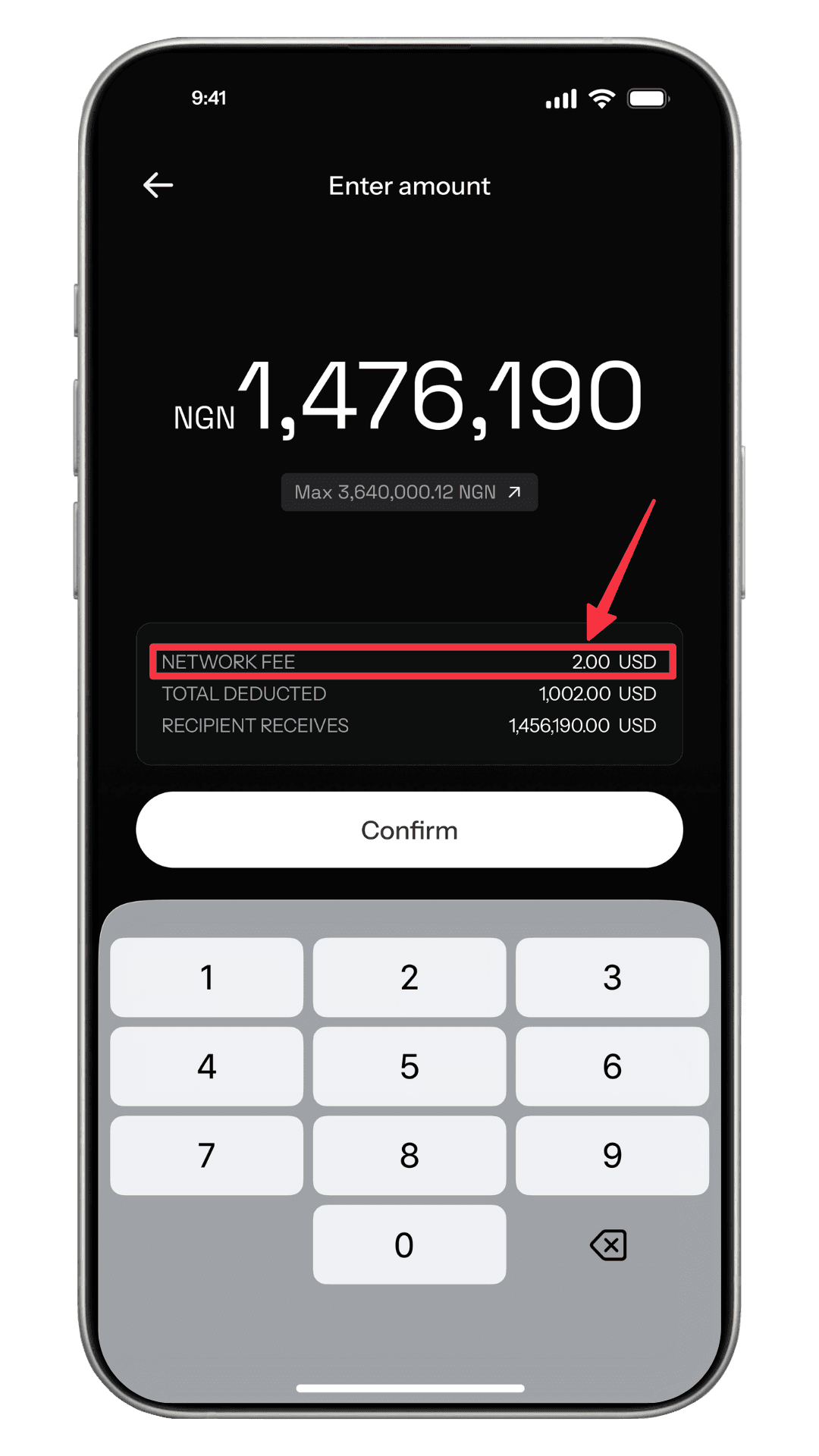
- Total paid: ~1,002 USDT (fee included)
- Fees: $2 flat network fee, shown upfront and included
- Amount received: ₦1,476,190 NGN
KAST shows the full cost and final payout in one screen before confirmation, with no additional deductions later.
Because the fee is fixed, the cost does not increase as the transfer size grows. You know the fee upfront, and the only variable left is the exchange rate.
Converting USD to NGN on Bitget P2P
On Bitget P2P, USD-to-local currency conversions are handled through peer-to-peer trading, and fees are typically embedded as a percentage-based cost.
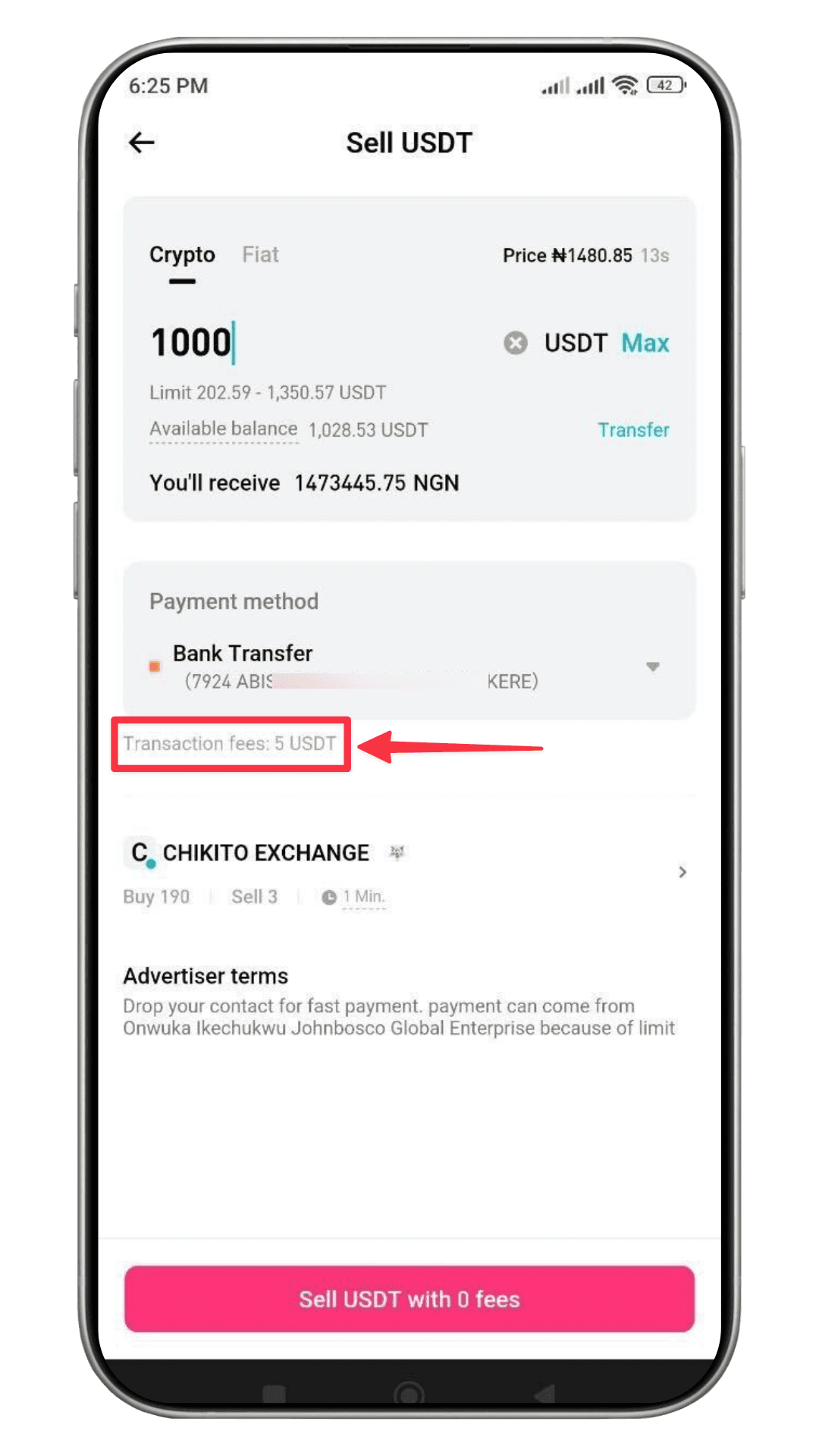
- Amount paid: 1,000 USDT
- Fees: 5 USDT transaction fee (applied separately)
- Amount received: ₦1,473,445.75 NGN
Bitget applies fees separately and relies on variable pricing and advertiser terms. Because pricing is set by individual users, rates can vary widely depending on demand, liquidity, and payment method. The fee impact also scales with the transaction size.
Total Cost Breakdown: KAST vs Bitget
When comparing total costs, the difference between KAST and Bitget becomes clear once you look beyond headline rates and focus on what’s actually deducted before the recipient receives funds.
Which Platform Is Cheaper for USD-to-Local Currency Transfers?
What matters isn’t the headline rate, it’s what you pay versus what you receive after everything settles.
In the two examples shown, the differences between KAST and Bitget are easy to see once you look at both sides of the transaction.
Total Cost Paid
With KAST, the user pays a total of about 1,002 USDT for the transaction, and that amount already includes the $2 network fee. You know exactly what’s leaving your balance before you confirm.
On the Bitget side, the user pays 1,000 USDT, but also incurs a 5 USDT transaction fee (shown on the sell screen), making the effective cost about 1,005 USDT once all charges are counted.
Final Local Currency Received
In the KAST example, after fees and conversion, the recipient receives ₦1,476,190 NGN. This total is presented in the app before you confirm the transfer.
On Bitget, selling 1,000 USDT results in ₦1,473,445.75 NGN, which is slightly lower than what KAST delivers when adjusting for the total effective cost (including Bitget's fee). It's also influenced by how Bitget's pricing is sourced via market or advertiser terms, which can vary.
In this snapshot comparison, KAST offers a cheaper and more transparent USD-to-NGN transfer overall, with fewer moving parts and clearer pricing.
More importantly, you see exactly what you’ll pay and receive before confirming. You shouldn’t need a calculator to know what’s landing in your account.
Ready to experience the future of finance?
Start using your crypto with KAST Card today.
Disclaimer: This content is provided by KAST Academy for educational purposes only and is not intended as financial advice or a recommendation to engage in any transaction. All information is provided "as-is" and does not account for your individual financial circumstances. Digital assets involve significant risk; the value of your investments may fluctuate, and you may lose your principal. Some products mentioned may be restricted in your jurisdiction. By continuing to read, you agree that KAST group, KAST Academy, its directors, officers and employees are not liable for any investment decisions or losses resulting from the use of this information.
Related articles
Peso Strong, Dollar Weak: What It Means for Your Money
A strong peso and weak dollar do not affect everyone the same way. Learn how exchange rates, FX fees, and where you earn and spend actually shape your buying power in Mexico.
USD vs AED: Which One Should You Pick on the Terminal in the UAE?
When a card terminal in the UAE asks whether to pay in USD or AED, that choice decides who sets your exchange rate. In most cases, choosing AED is cheaper. Here’s why.
Can I Withdraw Cash at an ATM Using My Crypto Card?
Crypto cards can withdraw cash at ATMs worldwide, but understanding how the process works matters. This guide breaks down how crypto card ATM withdrawals function behind the scenes, where fees come from, what determines limits, and when using an ATM actually makes sense.